A practical guide to AI-assisted estimates, takeoffs, and proposals
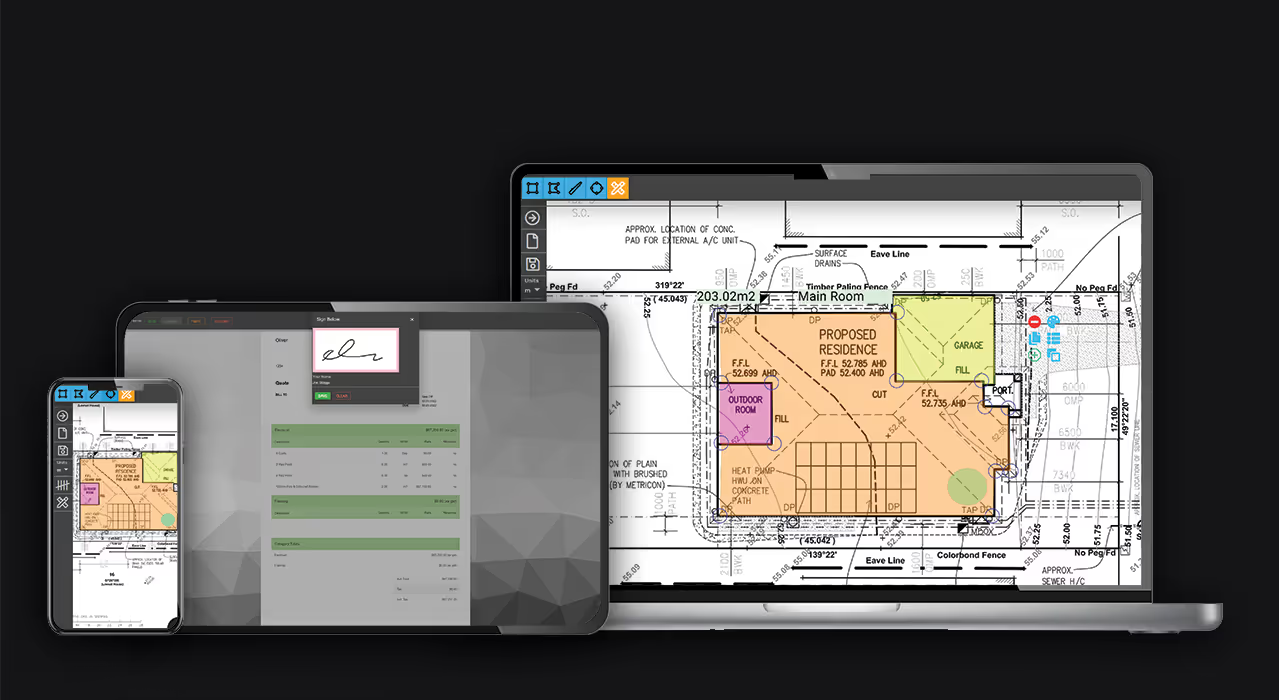
AI-assisted construction estimating can help contractors review plans, organize takeoff quantities, and prepare editable estimate details for customer proposals. CountBricks keeps estimating, takeoffs, quotes, invoices, and change orders in the same contractor workflow so teams can review the numbers before sending a quote.
Spreadsheets can work for simple jobs, but they often separate plan review, quantity takeoff, item pricing, customer details, and proposal notes. That separation makes it easier to miss scope, reuse stale prices, or lose the assumptions behind an allowance or change order.
AI-assisted estimating should make the job easier to structure, not hide the numbers. Start with a written or spoken scope and use plan or image measurements where quantities are needed. Keep materials, labor, units, costs, tax, markup, and allowances editable so the estimator can check the result.
See CountBricks AI construction estimating softwareExplore plan measurements and quantity review with CountBricks TakeoffsSupply the room details, surfaces, preparation, finish, and exclusions. For an illustrative repaint, review separate preparation, paint, and labor items rather than accepting one unexplained total. Confirm measured areas, coverage assumptions, labor rates, and any allowances before preparing the client quote.
CountBricks keeps estimate line items editable and connects reviewed work to quote and invoice workflows. The product walkthrough shows the estimating screens, pricing controls, and reusable item bundles; the repaint example here is an illustration, not a customer quote or a guaranteed AI result.
Follow the scope-to-itemized-estimate workflowCheck the source plans, quantities, units, item descriptions, current material and labor costs, tax, markup, allowances, and exclusions. Confirm what the client will see. Treat AI output as estimating assistance rather than a substitute for your scope and pricing decisions.
Once the estimate is reviewed, prepare the client-facing quote and keep later revisions, invoices, and change orders connected to the project. Compare the workflow against a small sample of your own work before using it for a live quote.