
Construction Project Boards That Keep Work in View
See where your projects stand and focus on the work that needs attention. Switch between board and list views, filter your projects, and update statuses as work progresses.
Ask about project boardsSee CountBricks pricing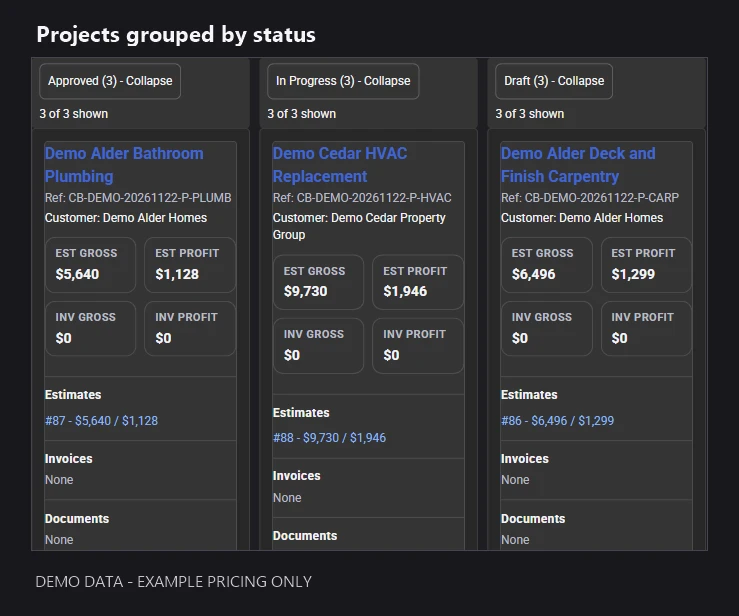
Demo project board. Project names and prices are fictional examples.
Choose the view that fits the way you work
Use the project board to see work grouped by status, or switch to a list when you want to scan project records. Filters help you narrow the view to the jobs you need to review.
Keep project statuses up to date
Move projects between statuses with desktop board controls or use the status selector on mobile. Keep your project view aligned with the progress your team records.
Return to a useful personal view
Save a personal view for the projects you check regularly. Your saved views stay in the same browser, so you can return to your preferred layout without setting it up again each time.
Keep related work within reach
Preview related records while reviewing a project, then open the full record when you need more detail. The information you can see follows your access permissions.
Project board questions
Can I use both board and list views?
Yes. Choose a board to review project statuses or a list to scan records, then use the available filters to focus your work.
Do personal views sync between devices?
Personal views are saved in the browser where you create them. They are not shared team views or cross-device settings.
Is the project board available for every account?
Availability depends on your account setup and permissions. Accounts using hierarchical project structures are not currently supported by this board workflow. Contact CountBricks to confirm suitability for your team.